9/17/2026
8/24/2026
7/28/2026
DAC processing technologies in CD changers from Technics and Yamaha
The 1990s were a fascinating period in digital audio history because "1-bit" meant different things depending on the manufacturer, and much of the marketing obscured what was really happening inside the DAC. Here is a deep dive into the DAC processing technologies used at the time.
The short version is this:
Technics MASH was one of the earliest commercially successful true 1-bit delta-sigma DAC architectures.
Yamaha 1-Bit was also a delta-sigma DAC but with different digital filtering and analog stages.
Yamaha S-Bit was essentially Yamaha's refinement of delta-sigma that attempted to reduce low-level distortion and idle tones.
Yamaha Pro-Bit moved away from pure single-bit operation and toward multi-bit delta-sigma, combining the advantages of both architectures.
Interestingly, by the late 1990s nearly every major DAC manufacturer had concluded that multi-bit delta-sigma was superior to pure 1-bit DACs, even though advertisements often continued to emphasize "1-bit."
Specifications Comparison
| Feature | Technics MASH | Yamaha 1-Bit | Yamaha S-Bit | Yamaha Pro-Bit |
|---|---|---|---|---|
| Core DAC | True 1-bit | True 1-bit | Improved 1-bit | Multi-bit delta-sigma |
| Noise shaping | Multi-stage | Single-stage | Enhanced | Multi-bit |
| Idle tones | Moderate | Moderate | Reduced | Nearly eliminated |
| Ultrasonic noise | Higher | Higher | Lower | Much lower |
| Analog filter complexity | Moderate | Moderate | Moderate | Simpler |
| Low-level linearity | Very good | Very good | Excellent | Excellent |
| Dynamic range (typical) | 100–110 dB | 96–104 dB | 100–108 dB | 105–112 dB |
| THD (typical) | 0.001–0.003% | 0.002–0.004% | 0.0015–0.003% | <0.0015% |
Background: Why 1-Bit DACs Appeared
During the 1980s, CD players primarily used:
14-bit DACs (early Philips)
16-bit ladder (R-2R) DACs
4x oversampling
8x oversampling
The biggest challenge with R-2R DACs was precision.
A true 16-bit ladder requires resistor matching accurate to roughly:
1 part in 65,536
That was extremely expensive.
If resistor matching isn't perfect:
harmonic distortion rises
linearity suffers
low-level detail disappears
Engineers looked for another solution.
The answer became:
Delta-Sigma modulation
Instead of accurately reproducing 65,536 voltage levels...
...produce only:
ON
OFF
at several million times per second.
The average equals the desired voltage.
What is Delta-Sigma?
Imagine trying to average exactly 25% brightness.
Instead of outputting:
25%
the DAC outputs
100%
0%
0%
0%

average = 25%
Or
100%
0%
100%
0%

average = 50%
Or
111001110010...
The analog output filter averages everything.
This removes the need for extremely precise resistors.
Technics MASH
MASH stands for
Multi-stage Noise Shaping
Technics introduced it around 1988.
This was one of the first successful consumer delta-sigma DACs.
Instead of one delta-sigma modulator...
MASH used multiple cascaded modulators.
Example:
PCM

↓

Noise Shaper #1

↓

Noise Shaper #2

↓

Noise Shaper #3

↓

1-bit stream

↓

Switching DAC

↓

Low-pass filter
Each stage removed more quantization noise.
Hence
Multi-stage Noise Shaping
Why MASH Was Innovative
Normal delta-sigma modulators could become unstable.
MASH divided the work among several stable stages.
Advantages:
very stable
mathematically predictable
low distortion
excellent measured performance
This architecture became extremely influential.
Noise Shaping
Quantization noise cannot disappear.
Instead,
MASH moves it upward.
Instead of:
Noise:

20Hz - 20kHz
it becomes
20Hz - 20kHz

very little noise

-------------------

100kHz+

large amount of noise
The analog filter removes it.
Typical MASH Specs
Early MASH:
18-bit equivalent resolution
THD around 0.003%
Dynamic range about 96–100 dB
Later MASH:
20-bit equivalent
22-bit processing
Dynamic range 105–110 dB
THD below 0.0015%
By the mid-1990s Technics had very impressive measurements.
Technics SL-PD5 CD changer


How MASH Sounds
Subjectively, listeners often describe it as:
clean
smooth
slightly warm
low listening fatigue
excellent bass
quiet background
Some listeners think:
treble slightly softened
less "air" than later DACs
This is often due more to:
analog output stage
digital filter design
than the DAC itself.
Yamaha 1-Bit DAC
Yamaha entered the market with their own delta-sigma implementation.
Unlike MASH,
their design focused heavily on
digital interpolation
filtering
clock design
rather than cascaded noise shaping.
Internally it still performed:
PCM
↓
Oversampling
↓
Noise shaping
↓
1-bit modulator
↓
Analog filter
Characteristics
Generally:
less aggressive noise shaping
emphasis on low jitter
carefully designed analog stages
Many Yamaha CD changers gained a reputation for:


Yamaha S-Bit
Around the mid-1990s,
Yamaha introduced
S-Bit
"S" generally referred to Super Bit.
This was not merely marketing.
It addressed one weakness of pure 1-bit DACs:
Idle tones.
What are Idle Tones?
Pure 1-bit DACs can create tiny repetitive patterns.
Instead of random noise:
1010101010
the DAC might repeat:
100100100100
That repetition becomes a faint tone.
Especially during:
quiet music
fade-outs
reverberation
Some listeners describe this as:
grain
glare
artificial texture
S-Bit used:
improved noise shaping
randomized modulation
better interpolation
Result:
Lower idle tones
Lower low-level distortion
More linear behavior
Measured improvements included
lower THD
cleaner low-level signals
wider dynamic range
Yamaha Pro-Bit
This represented Yamaha's biggest redesign.
Instead of remaining purely 1-bit,
they adopted
multi-bit delta-sigma.
This became the direction eventually taken by nearly every DAC manufacturer.
Why Multi-Bit?
Imagine instead of
ON

OFF
the DAC has
16 levels

or

32 levels

or

64 levels
The modulator no longer works as hard.
Advantages:
Much less ultrasonic noise.
Lower idle tones.
Lower distortion.
Better linearity.
Lower clock sensitivity.
Typical structure:
PCM

↓

Oversampling

↓

Multi-bit Noise Shaper

↓

5-bit or 6-bit DAC

↓

Analog filter
The analog filter becomes simpler.
Why Multi-Bit Won
Pure 1-bit DACs switch millions of times every second.
That creates:
RF noise
EMI
ultrasonic energy
Multi-bit DACs require much less switching.
Advantages:
easier analog filtering
lower distortion
better low-level accuracy
lower jitter sensitivity
This is why:
Burr-Brown
AKM
Crystal
Analog Devices
ESS
Cirrus
all eventually moved toward multi-bit delta-sigma.
Digital Filters
Technics favored:
steep linear-phase filters
high oversampling
aggressive noise shaping
Result:
Excellent measurements
Very clean sound
Yamaha often tuned:
interpolation filters
analog output circuitry
Their players frequently measured similarly while sounding subtly different.
Many listeners describe Yamaha players as:
spacious
airy
slightly more open
Technics as:
fuller
smoother
richer
Again, these impressions are highly system-dependent and not solely attributable to the DAC chip.
Specifications Comparison
| Feature | Technics MASH | Yamaha 1-Bit | Yamaha S-Bit | Yamaha Pro-Bit |
|---|---|---|---|---|
| Core DAC | True 1-bit | True 1-bit | Improved 1-bit | Multi-bit delta-sigma |
| Noise shaping | Multi-stage | Single-stage | Enhanced | Multi-bit |
| Idle tones | Moderate | Moderate | Reduced | Nearly eliminated |
| Ultrasonic noise | Higher | Higher | Lower | Much lower |
| Analog filter complexity | Moderate | Moderate | Moderate | Simpler |
| Low-level linearity | Very good | Very good | Excellent | Excellent |
| Dynamic range (typical) | 100–110 dB | 96–104 dB | 100–108 dB | 105–112 dB |
| THD (typical) | 0.001–0.003% | 0.002–0.004% | 0.0015–0.003% | <0.0015% |
Real-World Sound Differences
When comparing well-maintained 1990s CD changers, the audible differences between Technics MASH and Yamaha's various DAC implementations are often smaller than enthusiasts expect. Several factors tend to dominate the final sound:
Analog output stage. The op-amps, passive components, PCB layout, and power supply often contribute more to the sonic character than the DAC architecture itself.
Clock implementation. Excessive clock jitter in early digital designs could subtly affect imaging and high-frequency clarity, although competent designs from either brand generally kept jitter low enough that the analog stage remained the limiting factor.
Digital filter design. Different oversampling filters trade off passband flatness, phase response, and ringing behavior. These choices can influence transient presentation and are sometimes more audible than the underlying modulator topology.
Condition after 30 years. Aging electrolytic capacitors, worn laser assemblies, and drifting component values can have a larger impact on performance today than the original DAC differences.
If you compared two pristine, similarly engineered machines using the same analog circuitry, the progression would generally look like this:
Technics MASH: exceptionally smooth, stable, and quiet, with excellent measured performance for its era.
Yamaha 1-Bit: similarly clean, often perceived as slightly more open depending on the player's output stage and filter design.
Yamaha S-Bit: improved low-level refinement with fewer artifacts in quiet passages.
Yamaha Pro-Bit: the most technically advanced of Yamaha's 1990s architectures, offering the benefits of multi-bit delta-sigma such as lower ultrasonic noise, improved linearity, and reduced idle-tone behavior.
Bottom line
From an engineering perspective, Technics MASH was one of the landmark consumer 1-bit DAC architectures and deserved its reputation. It demonstrated that a carefully designed multi-stage noise-shaping system could deliver excellent objective performance while avoiding many stability issues of early delta-sigma designs.
Yamaha's progression from 1-Bit to S-Bit to Pro-Bit reflects the industry's broader evolution. Rather than abandoning delta-sigma, Yamaha refined it: first by addressing the practical limitations of pure 1-bit conversion (such as idle tones), then by adopting multi-bit delta-sigma techniques that reduced switching noise and improved linearity. That same architectural direction eventually became the foundation of nearly all modern high-performance audio DACs.
Source: Chatgpt 07-28-26

7/26/2026
Technics MASH 1 Bit DAC and its 5-CD Changer
Like a lot of folks today, I have been rediscovering the virtues of CD audio quality sound. Back in the 1990's, CDs were the highest quality source of of music. I have hundreds of CDs, along with several high quality Blu Ray players, but I have to use my TV to play these. The CD player has a place in many hi-fi systems today. Below is a Technics 5 CD Changer Model-SL-PD5. It features a 1-Bit DAC. The Technics MASH process converts the CD red book digital signal to a 1-Bit stream with 256 times over sampling, and then runs that through a filter and DAC. Below are photos and a discussion from Stereophile Magazine on the virtues of this amazing DAC. Later Technics models like the SL-PD5 offered optical outputs, which enable use of an external DAC. Other brands like Phillips and Sony have also introduced Bitstream 1-Bit DACs.
The Technics PD-807 5 Disc CD Changer with expanding tray featured the MASH D/A converter with programmable memory (below). Other Technics models continued the trend with other designs (below):


PDM, PWM, Delta-Sigma, 1-Bit DACs Peter W. Mitchell
Peter W. Mitchell wrote about MASH DACs in January 1990 (Vol.13 No.1):
In October 1989, Technics flew a dozen North American hi-fi writers, including myself, to Japan for a busy week including seminars about MASH 1-bit digital decoding. The "1-bit" digital decoder, is suddenly appearing everywhere. In recent years, competition among makers of CD players has taken the form of "bit wars," the use of ever-higher numbers of bits to decode the CD. Linear 16-bit decoders led to pseudo–18-bit decoding, then to real 18-bit decoders, and now several companies claim to be providing 20-bit decoding. If you don't read brochures carefully you may also come away with confused impressions about 24-, 32-, and even 45-bit processing (in digital filters).
The assumption, of course, is that more must be better. Re-sampling digital filters follow the same rule: if 2x re-sampling is good, 4x is better, and many of this year's best players use 8x. Decoder chips can be multiplied as well: early CD players used a single decoder, switched between channels. Now most players use two decoders, one per channel, while the newest high-performance models often use four D/A chips, a back-to-back pair in each channel.
It is possible to find engineering logic behind each of these design choices. The best reason for using 18- or 20-bit decoding, or back-to-back pairs of DACs, is that it can reduce the effect of decoder nonlinearity, providing more accurate decoding of the 16-bit data on the CD. Furthermore, the interpolations involved in "oversampling" digital filters have the effect of turning the original 16-bit data samples into 18-bit or longer digital words; using an 18- or 20-bit decoder reduces the distortion and noise that would be caused by rounding off the longer words or decoding only the topmost 16 bits.
Such improvements actually are realized in some high-priced players. But in midprice players the bit wars are just a marketing contest, a way to gain a competitive advantage by making specifications look better. In some factories the use of 18-bit or back-to-back DACs has become another excuse for avoiding the costly individual MSB fine-tuning that is required to obtain truly linear low-level decoding. The result, 18 months after this "CD cancer" became widely known, is that midprice CD players continue to vary greatly in linearity from sample to sample, and a 20-bit 4-DAC model of one brand may perform less well than another maker's 16-bit 2-DAC player. In this environment, the "bit" rating is little more than fraud.
"1-bit" processing is a fundamentally different approach from decoding the digital signal—a method that promises both finer performance in the very best CD players and more consistent performance in low-cost models. But at first it is sure to add confusion. If 18 bits is allegedly better than 16, how can a 1-bit decoder be considered hi-fi at all?
Two players with 1-bit decoding, the Technics SLP-555 and SLP-222, have been on the market since last spring, but the inclusion of the new decoder was kept a secret because the company wasn't ready to deal with this question. The brochures for those players incorrectly described them as having normal decoders in back-to-back pairs. This deception was intended not only to avoid causing confusion among consumers but also to prevent a rebellion among retail salespeople, who like to have a simple, persuasive description of each product they're trying to sell. In a "more bits is better" environment, 1-bit decoding would be a hard sell. Technics chose to postpone publicity about 1-bit decoding until the new year, and inviting hi-fi writers to a factory seminar was part of the plan.
The name, "1-bit" D/A conversion, is part of the problem because it engenders confusion without explaining anything. Philips's preferred name, "Bit-stream" decoding, is less confusing but still doesn't tell you very much. Fundamentally, the operation of a bit-stream decoder is not difficult to understand.
To appreciate why it's a better idea, let's begin at the beginning. Digital signal processing is inherently precise because it involves only simple on-off switching. Switches are either on or off; the accuracy of the result is not affected by the precision of the electrical parts involved, nor by the temperature, or other factors. If you have a sufficiently large number of electronic switches, operated rapidly, any desired result can be obtained. This is how computers work. And if you have too few switches for exact computation, the errors are predictable; known errors can be compensated (canceled) or can be averaged out by switching much more rapidly. (The latter is the basis of "dithering" to remove quantizing distortion in low-level signals.)
Analog processing is inherently approximate and variable, because the result depends on the physical properties of the parts used. For example, every digital device (recorder, CD player, et al) requires an output filter to reconstruct a smooth waveform and remove the ultrasonic byproducts of the digital switching process. In the early days of digital audio, those filters were complex analog circuits containing a dozen or more capacitors, inductors, and resistors. An analog filter is basically a frequency-dependent voltage divider: the signal is attenuated at each frequency according to the ratio of impedances in the circuit. Since impedances of electronic parts are specified only approximately and often vary with temperature, the response of an analog filter can be predicted only approximately. Even with selected high-precision parts it is impractical to achieve exact response, and a few years ago every digital product had a slightly different response—a built-in, nonadjustable tone control. Analog filters also exhibited a potentially audible group delay (phase shift) at high frequencies.
Then designers adopted digital filtering. A digital filter operates by combining signals after many brief time-delays (typically a few millionths of a second); in this process, unwanted signals simply cancel out. The response is controlled by the mathematical design of the filter, and by the delay times (which are precisely regulated by a crystal oscillator). Consequently manufacturers can mass-produce digital filters at very low cost, all with exactly the same response, accurate to a few thousandths of a dB. As a bonus, since the internal delays are the same for every frequency, digital filters are phase-linear.
Virtually all new CD players use digital filters, not because they contain more accurate parts, but because accurate response is inherent in their design (regardless of parts quality). Initially digital filters are more costly to design, but in mass-production they are less costly to use because they are all identical; there's no need to measure each one, grade them for accuracy, or match response in pairs.
The same reasoning underlies the development of bit-stream decoders. The problem with a conventional digital/analog converter (DAC) is that its operation involves mainly analog processes and is therefore approximate. A 16-bit DAC contains a precision current source and an array of 16 switches. Each switch is connected to a resistor, and the resistors are supposed to be scaled in exact 2:1 ratios so that each switch, when opened, will contribute exactly twice as much current to the output as the switch below it. The switches are controlled by the 16-bit codes from the CD; thus by opening and closing in various combinations, a total of 65,536 different output values can be generated.
But the topmost switch (the most-significant bit, or MSB) contributes 32,768 times as much current as the least-significant bit (LSB). If the MSB current is in error by as little as one part in 32,768, the effect of the LSB is swamped. In most CD players it is; few 16-bit DACs operate to better than 15-bit accuracy. The practical result is that most CD players are non-linear at very low signal levels, reproducing small signals at the wrong levels and with added distortion. Keep in mind that this problem arises not from the digital code itself but from small errors in an analog quantity—the current produced by the DAC for the several most-significant bits.
For comparison, imagine that you were assigned to fill a bucket with a known amount of water, using measuring cups varying in size from one ounce to 64 ounces. Even if you use care in filling the largest cup, it might contain 63.7 or 64.5 ounces instead of 64; you can't be sure that it contains exactly 64 times as much water as the smallest cup. But there is a way to obtain an exact result: use only the one-ounce cup, and transfer its contents to the bucket 64 times. The capacity of the cup may not be exactly one ounce, but as long as you fill it the same way each time, the total amount transferred will be proportional to the number of refills—an exactly linear relationship. This is the idea behind 1-bit decoding. In place of a method whose result depended on slightly uncertain analog quantities (the currents in the DAC), we have adopted a simple counting scheme—a purely digital process.
Of course with a small cup you'll have to work fast, but in modern digital electronics that's not an obstacle. In the Philips bitstream decoder, the output stage generates around ten million pulses per second, the exact rate being determined by the digital code. (This is called "pulse density modulation," or PDM.) A simple analog filter averages out the pulses to form the final analog output signal.
In all of the Japanese 1-bit decoders announced to date, the output stage is a pulse-width modulation (PWM) circuit of some type. In a PWM system the output signal is an on/off waveform in which the analog voltage is represented by the duration of the pulses, ie, the percentage of time the waveform remains in the "on" state. This is analogous to filling the bucket, not with a cup, but with a hose whose high-precision valve allows the water to flow in precisely timed bursts. When we want a larger amount of water, we use wider pulses (longer bursts).
The Technics MASH (multistage) decoder uses pulses of 11 different durations to form the output signal. The timing circuit that controls the pulses operates at a frequency of 33.9MHz, or 768 times higher than the 44.1kHz sampling rate of the digital codes in the CD. The transformation of the CD's original PCM signal into the final PWM waveform is determined mathematically and is accomplished entirely in the digital domain. In principle this can be done to any desired degree of accuracy, preserving all of the information in the original 16-bit code.
Summing up: to obtain exact frequency and phase response, manufacturers abandoned analog filters whose performance depended on inexact circuit impedances, and adopted digital filters whose response is controlled by mathematical operations and precisely timed delays. Now, to obtain consistently exact decoding of low-level signals, they intend to abandon conventional DACs whose accuracy is affected by uncertain analog quantities (currents flowing through resistors of slightly inexact value), and replace them with bitstream decoders whose accuracy, again, is determined by mathematics and timing (the number and duration of pulses).
The essential point is that the performance of a bitstream decoder, like that of a digital filter, depends on its design and is not expected to vary from sample to sample. Unlike PCM decoders, there is no need to quality-grade the chips for accuracy, nor to fine-tune the performance on the production line. Thus the bitstream decoder brings closer the day when CD players, too, can be assembled by robots with no need for individual adjustment or testing.
Conventional current-summing DACs also require a current/voltage conversion stage, which can be a source of slewing-induced distortion, plus a deglitching circuit to suppress the "glitch" (the high-current spike) that occurs when several bits change in imperfect synchrony. A bitstream decoder needs neither.
Stereophile readers have already seen an example of how good 1-bit decoding can be, in Larry Greenhill's review of Sansui's AU-X911DG integrated amplifier (November 1989, pp.144–150). The amplifier's integral D/A converter, called "LDCS" by Sansui, is actually a third-generation Technics MASH chip. LG loved its sound, while Robert Harley measured its linearity as "exceptionally accurate, among the best I have measured...nearly a perfect straight line."
You might reasonably suppose that, while introducing a significant technological advance, manufacturers would present a united front in communicating the benefits of the new approach to consumers. No such luck. A forthright presentation of the advantages of 1-bit decoding would require admitting how variable the performance of previous and current players has been. Besides, manufacturers like to promote the alleged uniqueness of their designs: they are launching 1-bit technology with a dizzying array of jargon aimed at making each version seem unique.
Philips, the first to go public with the new system, calls its version a Bitstream decoder process and uses a pulse density modulation (PDM) output circuit. Technics, which claims to have been working on 1-bit decoding since 1986 but is only going public with it now, calls its process MASH and uses a pulse-width modulation (PWM) output circuit. Harman/Kardon is using the Technics MASH decoder in two new CD players but confused many observers by calling it a "bitstream" decoder and comparing its performance to the Philips circuit. Sansui, as noted earlier, uses the Technics MASH chip in its Vintage series CD player and integrated amplifier, but calls it "LDCS." Sony appears to be using the Philips PDM circuit in several CD players marketed overseas (but not yet in the US), calling it a "High Density Linear Converter."
All of the new 1-bit decoders contain a "noise-shaping" digital filter that suppresses hiss, enhancing the S/N ratio, hence the resolution. Technics' trade name for its decoder is a quasi-acronym for this filter: MultistAge noise SHaping (MASH). The MASH chip that has been available since last spring is a third-generation design with a claimed S/N ratio of 108dB. Sony recently announced a new decoder using Sony Extended Noise Shaping (SENS) to achieve a claimed S/N ratio of 118dB. Not to be outdone, JVC announced a chip that uses PEM (pulse-edge modulation, a sort of one-sided PWM) and VANS (Victor Advanced Noise Shaping) to achieve 120dB. At its seminar for North American hi-fi writers, Technics capped this game of corporate one-upmanship by announcing that its third-generation chip will be used only in midprice players; the company's best players will contain a new fourth-generation MASH chip rated at 123dB.
Note that these specifications apply only to noise generated in the playback process; since virtually no CD has been recorded with a S/N ratio better than 90dB, these claims won't be realized with real recordings. (The measurement is made using a special test CD recorded with an all-zeroes code, with no dithering.)
But to demonstrate the superb linearity of the fourth-generation MASH decoder, Technics conducted a play-off comparing its newest player with current Denon and Sony models using 18- and 20-bit DACs. It was no contest; in the dithered glide tone from –60 to –120dB on the CBS test disc, the Sony produced audible distortion and the Denon generated obvious noise modulation due to nonlinearities in the DACs. (To be fair, these may have been worse-than-average samples off the production line.) The playback of this track by the Technics was the best I've ever heard, with no audible imperfection.
What appeals most to my Yankee soul is that this performance came from a decoder that is actually less costly to produce than a conventional DAC. MASH chips, or the equivalent from other manufacturers, can be used in CD players at virtually every price level. (A low-power version for portables hasn't been developed yet, but will be.) Within a couple of years, 1-bit decoders could be in every new CD player; then the cancer of nonlinear decoding will have been banished.
I don't want to leave the impression that all 1-bit decoders are alike in their performance or sound. There have been many rumors that the original Philips Bitstream decoder was not designed to leapfrog ahead of the best conventional DAC performance, but is just a way of obtaining consistent linearity in low-cost players. Further rumors suggest that Philips is working on a high-performance Bitstream decoder for introduction next year.
But the picture became confused at the British Penta hi-fi show in September, where an A/B comparison carried out by reviewer Paul Miller apparently persuaded many listeners that the present Philips Bitstream decoder sounds better than the best 18- and 20-bit conventional DACs. A friend of mine who heard the Penta demonstration examined the demonstration setup afterward; evidently the CD players were not accurately matched in level, and the comparison may have been invalid. Martin Colloms, writing in HFN/RR, added that in his own listening tests the present Philips circuit is a good mid-level performer but not equal to the best linear DACs.
Two weeks after my visit to Japan, the potential of 1-bit decoding was confirmed in a paper written by British mathematician Michael Gerzon for the New York convention of the Audio Engineering Society. In Gerzon's absence it was introduced and summarized by Stanley Lipshitz, who called it a very important paper (footnote 11). It is a mathematical analysis of the noise-shaping that is a central part of MASH and other 1-bit decoders, showing that with appropriate selection of the noise-shaping filter function, the effective dynamic range of CD playback can be increased by about 11dB, or nearly two bits' worth.
The actual limitation now lies at the recording end of the signal chain, with the nonlinearities and quantizing distortion in the A/D converters used in professional digital recorders. Gerzon's paper shows, and the Technics demonstration confirms, that if the recorded signal is correctly dithered to eliminate quantizing distortion, it is possible to record—and accurately resolve in playback—signals much smaller than the least-significant bit. (In theory this is also true with a conventional DAC, but only if it is precisely adjusted for good linearity, which real DACs usually aren't.) So while the CD is only a 16-bit storage medium, it is capable of 18-bit effective resolution and dynamic range. At the AES convention a designer of high-performance oversampling A/D converters told me that Sony will soon introduce a successor to its PCM-1630 CD mastering recorder, employing those A/D converters. Then the recent improvements in player design will really pay off.—Peter W. Mitchell
Footnote 11: "Optimal Noise Shaping and Dither of Digital Signals," Michael Gerzon and Peter G. Craven, AES Preprint 2822. Preprints are available from the Audio Engineering Society, 60 East 42nd Street, New York, NY 10165. Web: www.aes.org.
Source: https://www.stereophile.com/content/pdm-pwm-delta-sigma-1-bit-dacs-peter-w-mitchell
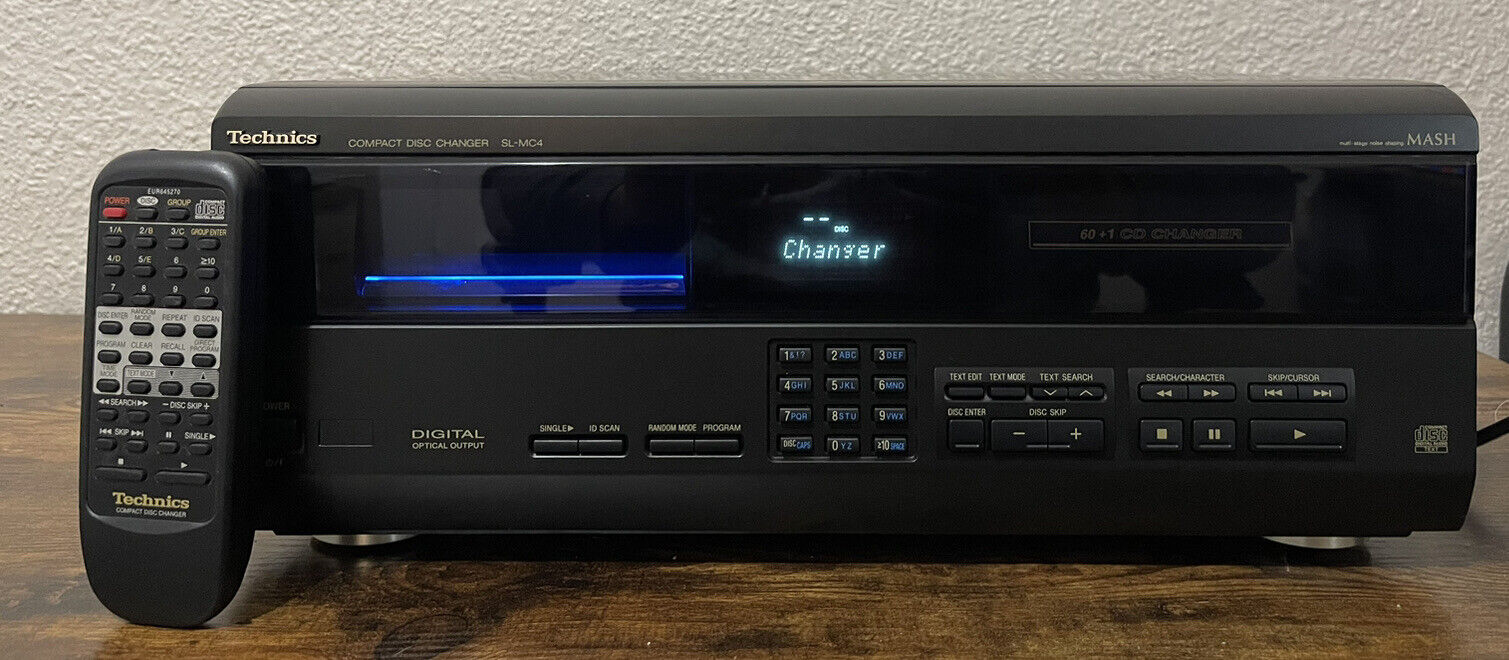
60+1 CD changer, digital optical output, CD text search and scrolling text display. Text edit function, phone-style 10 key enter pad, Quick disc change mechanism. Front loading mechanism allows to play one disc while changing another. Quick single play system, 14 preset grouping files.
Large-capacity CD changers are among the best bargains in today's audio market, and Technics is one of a handful of companies responsible for bringing them to a broad consumer base. The LS-MC4 61-disc changer/player is a well-crafted component that fits neatly into an entertainment rack while offering just enough storage capacity to keep most music lovers content.
This handsome player defies the "jukebox" description of many changers, measuring as it does less than seven inches high (with a standard width). The entire front-panel lifts down manually to reveal all 61 slots, with slot 1 reserved for single-disc play only. We were impressed with the build quality of the door mechanism, which slides down gently but firmly and doesn't appear prone to breakage. This mega-changer includes an optical-digital output for connecting to an outboard digital-to-analog converter or an surround receiver or processor with digital inputs.
We connected the LS-MC4 to an outboard digital-to-analog converter with a Toslink optical cable, plugged it in, slipped a CD in the single-disc slot, hit play, and whistled the tune of simplicity.
Since programming features can be rather complicated with today's computer-reliant changers, operating instructions are a must-read. Technics deserves credit for providing well-written, concise instructions on the multitude of programming options, including how to categorize discs by music genre (choose from 14, from Ballads to Oldies) and how to input customized text to identify discs (though a growing number of discs offer CD Text, which displays track and artist information automatically).
It took approximately 90 minutes to read the instructions and become comfortable with inputting text using both the remote control and the front-panel numeric keypads, which include letters just like a phone. It took a few trial-runs to get the procedure down, which was encumbered by the computer's 7-second limit to perform text entries. Once we got the hang of it, however, we had the procedure memorized after about half-a-dozen discs.
Obviously, programming 60 CDs is cumbersome and requires an afternoon of leisure time, but it's well-worth the effort, since it eliminates the task of searching for the right CD in a five-foot display rack or, worse, shuffling through the changer in search of a specific title. Once this mega-changer is armed and loaded, it brings added pleasure to general music listening, not to mention parties.
The LS-MC4 should top of any host's list of must-have electronics, since it can play a weekend worth of music with the touch of a button. Although sound quality doesn't seem to be a priority in mega-CD changers, the LS-MC4 is more than adequate for most music lovers, particularly when taking advantage of the fiber-optic audio output. Kudos to Technics for simplifying today's large-capacity CD changers with the LS-MC4.
7/14/2026
Where to find used audio equipment
Value audio shoppers are always looking for ways to improve their sound systems. Unfortunately a lot of the best audio equipment is no longer made. Words like vintage or classic are used. So where do you find older audio equipment, that was made back in the 1970's and later? We used to have to go to garage sales or vintage audio stores. Some retailers still exist. But now the Internet has made things easier to find and locate equipment on a global scale. And the new Artificial intelligence websites can research features, specs, photos, and compare models. Below is a list of search engines to find this gear.

Listhopper
Craigslist Search All Sites
Sales occur either via online auctions or "Buy It Now" instant sales, and the company charges commissions to sellers upon sale.
And some more suggestions from Google Gemini:
Depending on whether you're shopping for audiophile hi-fi gear, studio/recording equipment, or headphones, several specialized platforms offer better curation, seller verification, and protection than general platforms like eBay or Craigslist.
1. High-End Hi-Fi & Home Audio
- Audiogon: The gold standard marketplace for audiophiles. Excellent for finding pre-owned amps, turntables, DACs, and high-end speakers. Prices reflect market value well, and the seller community is knowledgeable.
- US Audio Mart (or UK/CAN Audio Mart): A dedicated, regional classified site specifically for home audio equipment. It operates similarly to traditional audio forums, typically featuring direct seller communication with fewer platform fees.
- HiFi Heaven (Pre-Owned Section): A trusted retailer that sells pre-owned, trade-in, and open-box hi-fi gear (amplifiers, phono stages, turntables) that has been checked or tested before listing.
2. Studio, Recording & General Music Gear
- Reverb: The largest dedicated marketplace for musical instruments, studio outboard gear, microphons, and vintage stereo receivers. Features robust buyer protection and price history tracking.
- Sweetwater Gear Exchange: Sweetwater’s dedicated user-to-user marketplace. Great for buying used audio interfaces, studio monitors, microphones, and rack gear with familiar account integration.
- Vintage King (Used & Vintage): Ideal for pro audio, studio consoles, tube microphones, and high-end preamps. Used items here are thoroughly bench-tested and restored by technicians before sale.
3. Dedicated Community Forums & Buy/Sell Classifieds
- Head-Fi (Buy/Sell/Trade): The premier destination for personal audio. If you are looking for used audiophile headphones, IEMs, portable DACs, or dedicated headphone amplifiers, the buy/sell forum here is unmatched.
- AudioKarma (Barter Town): One of the oldest vintage audio communities on the web. Their subscriber-only Barter Town section is packed with meticulously restored 1970s receivers, tube gear, and vintage speakers.
- Reddit (
r/AVexchange): A community marketplace specifically for headphones, DACs, amps, and home audio. Trades are tracked using seller verification bots to ensure trade history transparency.
4. Pro Live Sound & Commercial AV
- SoundBroker / Gearsupply: Best if you are looking for commercial PA speakers, line arrays, digital mixers, or rack amplifiers. Both cater heavily to live event spaces and production engineers.


7/07/2026
6/30/2026
Best home audio cd players or changers in 2026
If you're looking for a real hi-fi CD player (not a cheap portable or boombox), there are still several excellent choices under $500. The market is much smaller than it was 20 years ago, but companies like Yamaha, Onkyo, Denon, Cambridge Audio, and Integra continue to make quality players.
Best overall single-disc player
Yamaha CD-S303
$379.99
Why it's my top recommendation
Excellent transport mechanism
192 kHz/24-bit DAC
Optical and coaxial digital outputs
Pure Direct mode for cleaner analog playback
Outstanding reliability record
Around $380–450
If you have a good stereo receiver or integrated amplifier, this is probably the best value under $500. It consistently receives high marks for sound quality and build quality. (www.av.com)
Best 5-disc changer
Yamaha CD-C603 5-Disc CD Changer
$464.55
This is probably the best modern CD changer still being made.
Pros:
Holds five CDs
PlayXChange lets you swap four discs while one continues playing
USB playback
Same high-quality DAC family as Yamaha's single-disc player
Excellent sound quality
Price: about $465–500
If you enjoy loading several albums and listening for hours, this is the changer I'd buy. (www.av.com)
Best budget changer
Onkyo DX-C390 6-Disc CD Changer
$269.99
A classic that has been around for years.
Pros:
Six-disc carousel
Very dependable
Optical digital output
Plays MP3 CDs
Frequently under $300
It's one of the few affordable changers still widely available and remains popular because it's simple and reliable. (BestReviews)
Best audiophile value
Denon DCD-600NE
$499.00
Features:
Denon's AL32 Processing
Very smooth, musical sound
Excellent analog output stage
Solid chassis
Pure Direct mode
Typically around $450–500.
Many reviewers consider it one of the best-sounding players at this price. (Flavor365)
Best if you can find it around $450
Cambridge Audio AXC35
$449.00
Known for:
Warm, detailed sound
Wolfson DAC
Excellent build quality
Gapless playback
A favorite among budget audiophile systems.
If you specifically want a CD changer
My ranking would be:
Yamaha CD-C603 ⭐⭐⭐⭐⭐
Onkyo DX-C390 ⭐⭐⭐⭐½
Integra CDC-3.4 ⭐⭐⭐⭐½
The Integra is also an excellent six-disc changer if you prefer its styling or features.
Integra CDC-3.4
$382.49
Should you buy vintage?
If you're comfortable buying used, you can often get exceptional value from older high-end players:
Vintage Yamaha
Vintage Sony ES
Vintage Denon
Vintage Marantz
Vintage Rotel
For under $200, a well-maintained 1990s or early-2000s high-end player can outperform many new budget models. The trade-off is that lasers and loading mechanisms may eventually need service. Many enthusiasts still recommend quality vintage single-disc transports over older changers because there are fewer moving parts to fail. (Reddit)
My recommendations by use case
Best overall: Yamaha CD-S303
Best CD changer: Yamaha CD-C603
Best value changer: Onkyo DX-C390
Best sound quality under $500: Denon DCD-600NE
Best audiophile bargain: Cambridge Audio AXC35
If your system is built around a quality receiver or amplifier from brands like Yamaha, Marantz, Denon, or NAD, I'd lean toward the Yamaha CD-S303 for a single-disc player or the Yamaha CD-C603 if you want a changer. Both offer a combination of sound quality, reliability, and long-term support that's difficult to beat in this price range.
Source: ChatGPT
6/12/2026
Internet Radio vs. Terrestrial FM Radio : The Advantages
 The migration from FM frequencies to the internet comes down to distinct advantages for both the people making the audio and the people listening to it. Below are some features and pros and cons.

The Listener's Advantages (Why Internet Audio is Winning)
Niche Personalization: FM radio relies on "broad appeal" to survive, which results in repetitive playlists. Internet radio can cater to hyper-specific genres, indie artists, and obscure subcultures that would never get airtime on traditional frequencies.
Device Flexibility: You no longer need a standalone radio receiver. Internet radio integrates seamlessly into smartphones, wireless earbuds, desktop computers, and smart home speakers.
On-Demand Hybridization: Many modern internet radio stations archive their live broadcasts as podcasts or on-demand streams, completely removing the limitation of "if you miss it live, it's gone."
The Broadcaster's Advantages (Why Creators are Shifting)
Drastically Lower Overhead: You don't need a multi-million dollar broadcast tower. Using internet audio platforms allows independent creators and community stations to run fully licensed stations at a fraction of the cost.
Better Monetization: Because digital streams can track precise user data, internet radio stations can serve hyper-targeted programmatic ads, making commercial space much more valuable to advertisers than a generic local FM ad broadcast to a whole city.
Source: Google Gemini
What are the Internet Radio station streaming quality bitrates?
Streaming bitrates for internet radio can be a bit tricky because they generally fall into two categories: aggregators/directories (which just pass along whatever bitrate the individual station broadcasts) and proprietary streaming services (which control their own servers and audio compression).The streaming bitrates for the requested platforms are broken down below.
Platform-by-Platform Breakdown
💡 Quick Guide to Codecs
Don't let lower numbers like 32 kbps or 64 kbps entirely fool you. Services that use newer compression codecs like AAC or AAC+ (HE-AAC) sound significantly cleaner at lower bitrates than old-school MP3 streams. For example, a 64 kbps AAC+ stream will typically sound just as good as a 128 kbps MP3 stream while consuming exactly half the cellular data.


5/30/2026
Top Free Internet Radio Websites - 05-2026

1. TuneIn
- One of the largest internet radio directories.
- Offers live radio from around the world: music, news, sports, talk.
- Easy to browse by genre, country, or trending stations.
2. Radio Garden
- Explore live radio stations around the globe using an interactive map.
- Fun and intuitive interface—just spin the globe and click a station.
3. Streema / Simple Radio
- Huge catalog of stations worldwide.
- Lets you filter by genre, country, or city.
- Clean interface; good for discovering both mainstream and local stations.
4. AccuRadio
- Curated music stations with a focus on genres and moods.
- Easy to navigate with minimal ads.
- Great if you want a genre-specific listening experience.
5. Live365
- Mix of professional and independent radio stations.
- Includes niche genres: jazz, electronic, talk, world music.
- Free listening supported by ads.
6. Radio.net
- Global directory with thousands of stations.
- Browse by genre, country, or popularity.
- Offers a simple and fast web player.
7. Internet-Radio.com
- One of the older directories for free internet radio.
- Offers music, talk, and specialty stations.
- Stations sorted by genre, country, or popularity.
💡 Extra Tip:
If you want instant listening, sites like Radio Garden or AccuRadio let you click a station and start playing without signing up, which is perfect for quick access.
Source: chatgpt 05-22-26
5/29/2026
The Death of FM Radio and the Rise of Streaming

Nowadays, tuning into the radio can feel like visiting a foreign country. Many stations play a small and repetitive catalog of fan favorites that feels increasingly stale. At the same time, songs that have passed their moment in the cultural zeitgeist hang around the airwaves as stations struggle to keep up with tastes moving at light speed. The radio is no longer the primary place for songs to be recommended and shared, having largely been replaced by subscription-based streaming services such as Spotify and Apple Music. This transition has had profound effects on how music is made, shared, and compensated.
Before one analyzes the ways streaming has changed music, it’s important to understand the limitations that held radio back and made it vulnerable to being replaced. Back in the days when music was primarily stored on physical media such as vinyls, cassettes, or CDs, radio stations filled a gap in the market. It introduced people to new music and freed listeners from the burden of carrying around their music library with them. But as Walkmans gave way to the iPod, it became easier to transport a greater quantity of music, and listening habits shifted away from relying on what the radio was playing.
Beyond technological advancements, cultural changes have also contributed to making the radio obsolete. Federal guidelines that govern the use of public airwaves – which AM and FM radio stations operate on – ban the use of curse words and references to sex and drugs. This regulation has been in place since the 1970s, and it is why artists have often released clean or radio versions of their songs. Many artists have come to view this regulation as restricting and burdensome, opting to forgo radio versions of their songs altogether. This decision has taken on even more significance as hip-hop and R&B — both genres that often run afoul of these restrictions — rose in popularity over the last few decades to become two of the most popular genres in the country. This restriction leaves radio stations unable to play some of the most popular songs, even as streaming services offer them on-demand, alienating millions of potential listeners and further shifting consumers towards streaming services.
By now, the shift to streaming seems complete. Streaming accounted for 84% of the music industry’s revenue last year. Since streaming services have firmly cemented themselves as the dominant players in the industry, they’ve begun exerting their influence to set the rules and terms of engagement for artists. In one of the most noticeable changes of the streaming era, songs are getting increasingly shorter in order to optimize royalty payments. Under Spotify’s payment formula, users only have to listen to the first thirty seconds of a track to register a stream and thus a royalty payment, rendering the rest of the song irrelevant to profit margins. As there are only so many hours in a day, artists stand to make more money by releasing multiple short tracks that each count towards a payment rather than a few longer songs. Aside from shortening songs, this formula also incentivizes artists to open with the chorus or a catchier hook in order to keep users listening up to the thirty-second mark, which has played a part in shrinking the average instrumental intro from twenty seconds in the 1980s to five seconds in 2015.
In the United States, royalty rates for both radio stations and streaming services are set by the Copyright Royalty Board, which updates the rates every 5 years. While this is supposed to set industry-wide standards that consider the interests of both artists and distributors, streaming platforms have created loopholes to pay a different rate that they determine themselves. In 2024, Apple Music announced it would pay artists 10% more for tracks recorded with spatial audio. This announcement generated controversy among smaller artists who pointed out that recording in spatial audio can cost an extra ten to twenty thousand dollars per album, posing a barrier for artists who can’t afford those expenses. For its part, in 2024, Spotify reclassified premium accounts as bundles of podcasts and music, allowing the service to pay out a lower mechanical royalty rate. Spotify was sued by the Mechanical Licensing Collective over this change, and the case remains ongoing in a decision that would impact $150 million of the platform’s revenue.
The shift toward streaming services has created two main ways for music to be shared. The first is through company-curated playlists, such as the Spotify mix Rap Caviar that has nearly 16 million followers, a figure that dwarfs the audience of most music radio programs. The second is through a service's recommendation algorithm that suggests artists and songs a user might like based on their listening history. These two features not only replace a role previously filled by radio DJs, they also place a significant amount of power and influence squarely in the hands of streaming services. Without discerning human tastes, algorithms often base their recommendations on more superficial qualities, such as the name of the playlist or songs by artists already in the mix, regardless of whether or not they match the genre or vibe a user is trying to cultivate. A particularly egregious example is Spotify’s daylist mix, which is meant to track your listening habits and suggest songs in genres you tend to listen to at given times. Yet it often gets led astray, and can end up recommending Phoebe Bridgers on a bossa nova playlist or Lorde on a playlist meant for West Coast hip-hop.
While the shift away from a radio centered music industry has made it easier than ever for artists to upload their music to services and connect to fans, this democratization has been a double edged sword. If everyone has the same ease of access to put their music out, it becomes that much harder for individual artists to stand out in a crowd of millions.
This conundrum is exactly why streaming service’s algorithms are so vital, and these platforms know it. Spotify runs their Discovery program, offering artists a chance of improved visibility in the platform’s catered recommendations in exchange for a lower royalty payment. Musicians must then struggle to choose between better chances at visibility or marginally better pay. For smaller artists, this can be an incredibly difficult question to answer as they try to make a living. This situation was complicated further by Spotify’s rule change in 2023 that stopped paying artists for songs that get less than one thousand streams a year in an attempt to crack down on artificial streaming.
These changes aren’t necessarily felt equally across the industry, as larger artists have been able to exert their influence and fame to extract favorable concessions. A prominent example of this unequal landscape was Taylor Swift’s boycott of Spotify in 2014, when she opted to keep her catalog off the platform until the royalties paid out to artists were increased. Spotify subsequently acquiesced to her demands in 2017, ending the 3 year standoff. Yet this negotiation is one that few artists can conceivably pull off, leaving most performers at the whim of the new streaming kingmakers.
The shift away from radio is just the latest upheaval artists have faced in the last few years as they navigate the industry. In recognition of the new power dynamics at play and the challenges smaller artists face to get by, new proposals have been floated to alter the way streaming companies share their profits. Some advocate for changing how services pay artists for each listener’s stream, giving artists greater control over their profiles and recommendations, and reducing the amount of corporate-curated playlists that get recommended to users. While each proposal has benefits and drawbacks, the variety of suggestions indicates a broad discontent among artists. Governments spent the 20th century trying to regulate the radio system to ensure fairness, and it may be time to turn a regulatory eye towards the streaming industry in this new era.
Source: https://www.tastemakersmag.com/articles/the-death-of-radio